
Freedom Pro
Premium offline debt payoff and FIRE tracker for desktop browsers and tablets. Plan payoff strategies, log payments, monitor net worth, and keep financial data private in local browser storage — no account, no subscription.
Freedom Pro is a privacy-first personal finance application built for desktop computers and tablets in modern browsers. It helps you plan debt payoff with avalanche and snowball strategies, track payment history, monitor net worth, view FIRE progress, and export backups — with every number stored locally in your browser. No account is required, there is no subscription, and the app works offline after initial load or install. Freedom Pro is not currently optimized for mobile phone screens.
Private app access link + access key delivered after purchase.
- Version
- 1.0.0
- Updated
- 2026-07-02
- Platform
- Desktop & tablet web application for modern browsers
Product Gallery
Explore Freedom Pro through real product screenshots covering debt management, payoff planning, FIRE tracking, payment history, settings, backup, and tablet use.
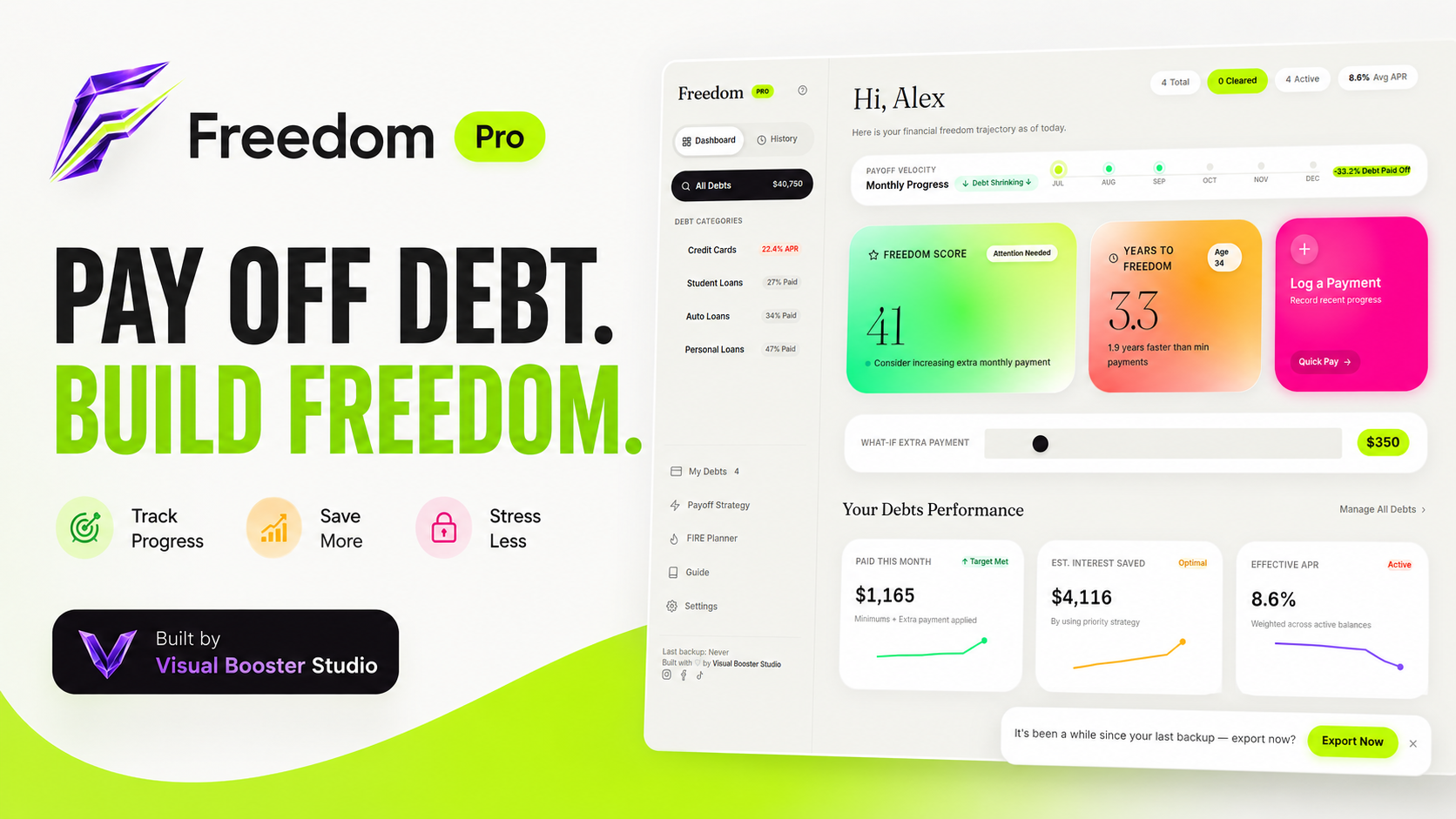
Freedom Pro product walkthrough
Debt payoff planning, FIRE tracking, payment logs, and privacy-first local storage on desktop and tablet browsers.
Debt balances, payoff plans and FIRE goals scattered across notes and spreadsheets make it hard to see your real timeline, stay consistent, or trust that your financial data stays private.
Key Features
Debt Payoff Dashboard
Freedom Score, payoff timeline, and momentum at a glance.
Avalanche & Snowball Strategies
Compare mathematically optimal and motivational payoff paths side by side.
FIRE Progress Calculator
Model your FI number, savings rate, and projected independence age.
Net Worth Tracking
Assets, debts, and liabilities in one private financial snapshot.
Payment History & Logs
Record every payment and review a complete payoff history.
Interactive Charts & Insights
Visualize payoff trajectories, interest savings, and FIRE progress.
Export & Import Backup
Save and restore your data as a portable JSON backup file.
Offline / Local Browser Storage
100% client-side — your data never leaves your device.
No Account Required
Open and use instantly with zero sign-up, subscription, or server sync.
Who It Is For
- Debt-free seekers
- FIRE planners
- Desktop & tablet users
- Privacy-conscious personal finance users
Compatibility
$7.99 one-time. No subscription required.
Private app access link + access key delivered after purchase.
Getting Started
- Step 1
Enter your access key.
- Step 2
Freedom Pro opens.
- Step 3
Install the app from the sidebar. If the Install App button is not visible, refresh the browser once.
Product Questions
Does Freedom Pro require an account or subscription?
No. Freedom Pro requires no account, no login, and no subscription. It runs entirely in your browser with data stored locally on your device.
Where is my financial data stored?
All data is stored locally in your browser using client-side storage. Nothing is sent to a server, so your numbers stay private on your device.
Can I use Freedom Pro offline?
Yes. After the initial load or install, Freedom Pro is offline capable and continues working without an internet connection.
What devices and browsers are supported?
Freedom Pro is built for desktop computers and tablets in modern browsers. It is not currently optimized for mobile phone screens.
Can I back up or move my data?
Yes. Freedom Pro includes export and import backup options so you can save a JSON backup before clearing browser data or switching devices.
What do I receive after purchase?
Private app access link and access key delivered after purchase.
Updates & Support
Privacy-first product guidance, updates, and setup support.
Works Best On
- Windows 10/11 — Chrome, Edge
- macOS — Chrome, Edge, Safari web app
- Linux — Chrome / Chromium-based browsers
- Android tablets — Chrome
- iPad — Safari using Add to Home Screen / web app
Limited or Not Recommended
- Mobile phone screens — not optimized
- Firefox desktop — browser use may work, but installed-app behavior is not guaranteed
- Older browsers — not supported
Important Notes
- Works offline after initial load or installation
- Data stays locally on the device/browser
- Export a JSON backup before clearing browser data or switching devices
Related Applications
NeuroLux Finance
An ADHD-friendly personal finance app for managing bills, accounts, goals, transfers, credit-card payments, and safe-to-spend money in one calm visual workspace.
View ApplicationVBS Money Manager
Track income, expenses, budgets, accounts, goals, and reports in one private local-first money management app.
View Application