
VBS Prompt OS
Stop losing your best prompts.
Organize your best AI prompts, images, notes, tags, AI platforms, and collections in one private local-first workspace.
Private app link and access password delivered after purchase.
- Version
- 1.0.0
- Platform
- Windows, macOS, Linux via installable PWA
- Storage
- Local device storage
- Internet
- Works offline after first load
Product Gallery
Explore VBS Prompt OS through real product screenshots — dashboard, prompts, collections, AI library, tags, backup, and mobile.
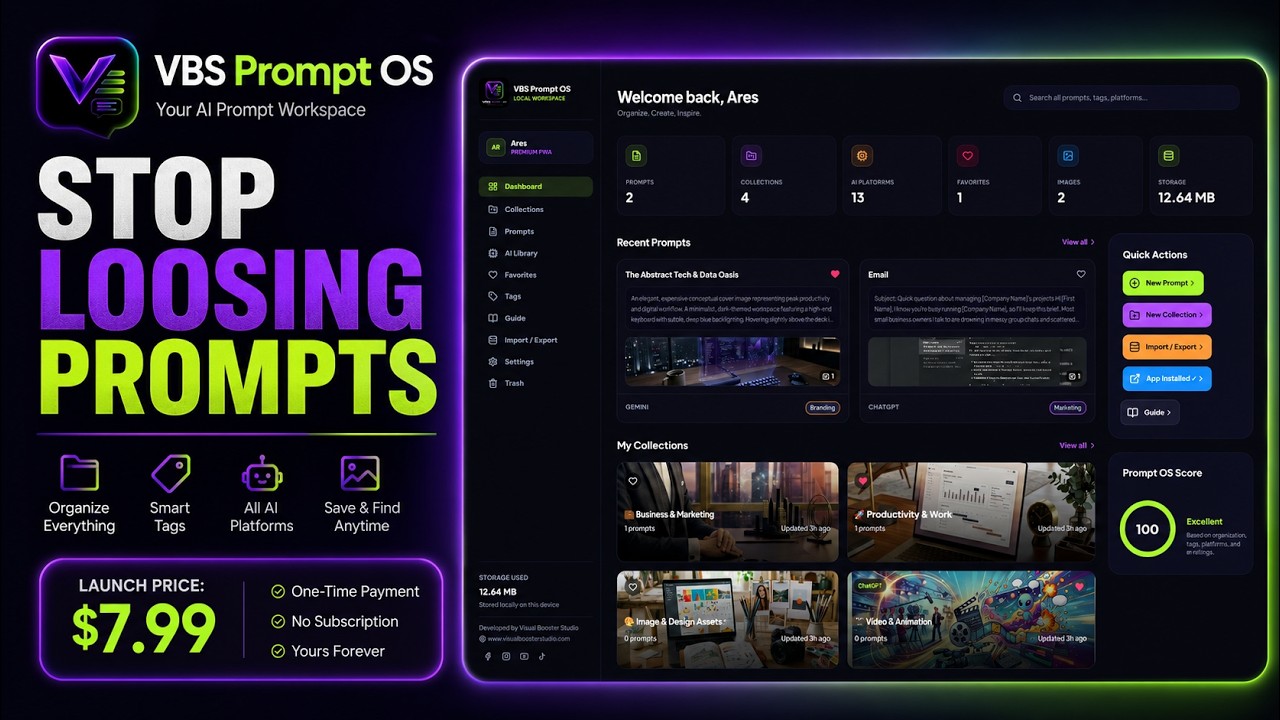
VBS Prompt OS product walkthrough
See how to organize prompts, collections, AI platforms, favorites, tags, backups, settings, and more.
Your best prompts disappear into chat history, scattered notes, and random folders — and the images and context that made them work disappear with them.
Key Features
Complete Prompt Records
Save title, prompt text, notes, ratings, tags, and AI platform together in one record.
Reference & Result Images
Attach reference images and result images so context stays with the prompt.
Custom Collections
Organize prompts into custom collections for projects, clients, or workflows.
AI Platform Filters
Filter by AI platform and keep each prompt tied to the tool it was built for.
Custom Platforms, Tags & Categories
Create the AI platforms, tags, and categories your workflow actually needs.
Favorites
Star important prompts so your best work is always one click away.
Global Search
Find prompts fast across titles, content, tags, and related context.
Drag & Reorder
Drag and reorder prompts inside collections to match how you work.
Light & Dark Themes
Switch between light and dark themes for comfortable day or night sessions.
Backup, Export, Import & Reset
Export backups, import workspaces, and reset when you need a clean start.
Installable PWA
Install VBS Prompt OS as a standalone app on Windows, macOS, and Linux.
Works Offline
Keep organizing prompts after the first load — no constant connection required.
No Login, No Cloud, No Subscription
Private local-first workspace with no account, no cloud database, and no recurring fee.
Who It Is For
- AI creators and prompt builders
- Designers and creative directors
- Content teams shipping with AI tools
- Anyone who wants prompts private and organized
Compatibility
$7.99 one-time. No subscription required. Private app link and access password delivered after purchase.
Private app link and access password delivered after purchase.
How It Works
From purchase to offline workspace in five clear steps.
- Step 1
Buy VBS Prompt OS
- Step 2
Receive private app link and access password
- Step 3
Open and unlock the app
- Step 4
Install it on your device
- Step 5
Organize prompts and use it offline
Local-First by Design
Your prompts stay on your device — not in a cloud database.
- No account
- No login
- No cloud database
- No subscription
- Prompt data stays on the user's device
- Images are stored locally
- Backup remains under user control
Build your private prompt system
One-time purchase. Installable PWA. Offline after first load. Your prompts stay on your device.
Private app link and access password delivered after purchase.
Product Questions
Does VBS Prompt OS require an account or subscription?
No. There is no account, no login, no cloud database, and no subscription. You buy once and use the private app on your devices.
Where are my prompts and images stored?
Prompt text, notes, tags, collections, and images are stored locally on your device. Nothing is sent to a cloud database.
Can I use VBS Prompt OS offline?
Yes. After the first load, the installable PWA continues working offline so your workspace stays available without the internet.
What do I receive after purchase?
A private app link and access password delivered after purchase so you can open and unlock VBS Prompt OS.
Can I back up or move my data?
Yes. Built-in export and import let you save a backup, restore it later, or move your workspace when you switch devices.
Which platforms are supported?
Windows, macOS, and Linux via an installable PWA in modern browsers. Mobile browsers are supported where install/add-to-home-screen is available.
Updates & Support
Local-first product guidance, updates, and setup support.
Works Best On
- Windows — Chrome, Edge (installable PWA)
- macOS — Chrome, Edge, Safari web app
- Linux — Chrome / Chromium-based browsers
- Installable as a standalone app after unlock
Privacy & Storage
- No account and no login
- No cloud database
- Prompt data and images stay on your device
- Backup export remains under your control
Important Notes
- Works offline after first load
- One-time purchase — no subscription
- Export a backup before clearing browser data or switching devices
Related Applications
Freedom Pro
Premium offline debt payoff and FIRE tracker for desktop browsers and tablets. Plan payoff strategies, log payments, monitor net worth, and keep financial data private in local browser storage — no account, no subscription.
View ApplicationTask Manager
Organize tasks, teams & projects efficiently.
Coming Soon